The Lincx script is a snippet of JavaScript generated by the platform that you will need to place on your website in order to render an ad feed on your page.
In its most basic form, it appears like so:
<script
  src="https://api.lincx.com/load"
  data-zone-id="dwiqlb"
>
</script>
To find your script, navigate to Publishers > Zones, then click on the 'Copy script' icon for the zone pertaining to your page:
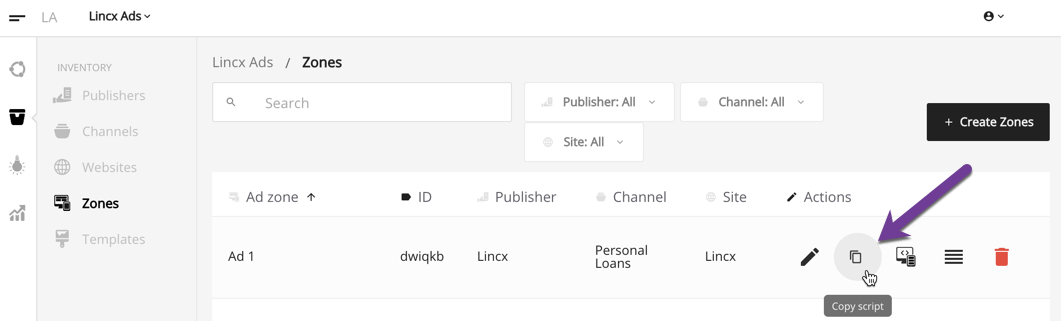
Simply paste the script inside of the HTML tag that you want your ad feed to render. This is the easiest way to deploy, and is called 'Automatic Mode' as described in the following section.
If you are working with a developer, you can send them this script, along with a link to this page for further reference on setup and advanced options.
Automatic Mode
By default, the script will use automatic render mode. That means that the script tag will render the ads into its nearest parent HTML element. For example:
<div id="parent">
  <script
  src="https://api.lincx.com/load"
  data-zone-id="dg65nc">
  </script>
</div>
When the ads data is loaded from server, it will become:
<div id="parent">
  <div id="ad-1">ad 1</div>
  <div id="ad-2">ad 2</div>
  <div id="ad-3">ad 3</div>
  <script
    src="https://api.lincx.com/load"
    data-zone-id="dg65nc">
  </script>
</div>
Please note: The attribute id="parent" only used here for demonstration purposes and it not necessary for implementation.
Manual Rendering Mode
For more fine-grain control over rendering and targeting, you can leverage Manual Rendering Mode. The first step is to set the manual render mode to true:
<script
 src="https://api.lincx.com/load"
 data-manual-render="true">
</script>
In this case you do not place the tag inside of the target element. Everything will happen at the bottom of your document before the </body> tag.
When data-manual-render="true", manual render is enabled. After the script tag has finished loading its content, a helper method is available: window.lincx
window.lincx method definition:
window.lincx(target, opts)
| Param | Value | Meaning |
| target | A valid HTML DOM Node | The container target that you want your ads rendered into |
| opts | Object | Options for rendering, equivalent to the data- params. For example data-geo-state will be opts.geoState |
Now, you simply tell the Lincx client where you want the ads to be rendered along with any optional data you want to pass to the ad server:
<script>
  var target = document.getElementById('target')
  window.lincx(target, {
    zoneId: 'abc123',
    // s1: 'trafficSourceA', // included in "default" reporting
    // s2: 'trafficSourceSubID', // included in "default" reporting
    // s3: 'otherNonUniqueIdentifier', // included in "default" reporting
    // affClickId: 'jrnt5zp9', // available as a macro
    // scoreKey: 'trafficSourceA', // segments scoring to only this label
 })
</script>
Only target and zoneId are required.
Here is a complete example:
<!DOCTYPE html>
<html lang="en" dir="ltr">
    <head>
        <meta charset="utf-8">
        <title>Publisher.com</title>
    </head>
    <body>
        <h1>Offers</h1>
        <div id="target">

        </div>

        <!-- Load the Lincx Client in "manual" mode -->
        <script
            src="https://api.lincx.com/load"
            data-manual-render="true">
        </script>

        <!-- Tell the Lincx Client where you would like ads to be rendered -->
        <script>
            var target = document.getElementById('target')
            window.lincx(target, {
                zoneId: 'abc123',
                // s1: 'trafficSourceA', // included in "default" reporting
                // s2: 'trafficSourceSubID', // included in "default" reporting
                // s3: 'otherNonUniqueIdentifier', // included in "default" reporting
                // affClickId: 'jrnt5zp9', // available as a macro
                // scoreKey: 'trafficSourceA', // segments scoring to only this label
            })
        </script>
    </body>
</html>
Using data- attributes through URL query string params
Instead of using data-* attributes or providing them to window.lincx(), they can be pulled from the URL query string params. Any URL query params prefixed with lincx- will be used. This can very useful in situations where other stakeholders need to be able to pass information to Lincx on the fly, such as media buyers passing in traffic sources. For example, they can simply add lincx-s1=trafficsource to the URL when directing traffic to the page.
https://publisher.com/somepage?lincx-color=red&lincx-otherCriteria=value
is the same as:
<script
  src="https://api.lincx.com/load"
  data-zone-id="abc123"
  data-color="red"
  data-other-criteria="value">
</script>
which is also the same as:
window.lincx(target, {
  zoneId: 'abc123',
  color: 'red',
  otherCriteria: 'value'
})